Book more calls from LinkedIn,without risking your account.
Nova finds the people who fit, reads their posts and company news, and drafts every message in your voice. You approve each one. Nova sends at a human pace and follows up by email when an invite goes quiet.
Prospecting on LinkedIn works.Doing it by hand eats your week.
Finding the right people, reading up on each one, writing something worth answering and chasing the quiet ones is most of a working day. Most tools automate only the sending, so you get templates nobody answers, or a warning from LinkedIn. Nova does all four jobs — whether you’re a founder selling your own product, an agency running several senders, or a recruiter — and you stay the one who approves what goes out.
FIG. — THE NOVA STACK
01 / 04
ICP agents — Agents write their own searches each morning and score who fits.
Research & writing — Reads each person’s posts, role and company news, then drafts in your voice.
Safety governor — Holds each account to a daily budget that ramps as it earns trust.
Follow-up & inbox — Unanswered invites move to email on day 7. Replies land in one inbox.
HOW IT WORKS
Set up once.New leads to review every morning.
Connect your accounts and describe your buyer. From then on Nova finds people, researches them, drafts the messages and follows up. You approve what goes out.
01 / CONNECT
Connect LinkedIn, your mailbox and your voice.
Add LinkedIn in one click with the browser extension, then connect your mailbox so every message comes from your own domain. Nova reads your posts to learn how you write. That’s the whole setup.
Your accounts. Your domain. Your voice.
A LOOK INSIDE NOVA
Your workspaceNova
LinkedInvia browser extensionConnected
aarav@yourcompany.comConnected
Your tone, learned from 42 of your posts.
Direct, low-hype92
Short sentences88
02 / DESCRIBE
Tell Nova who you sell to.
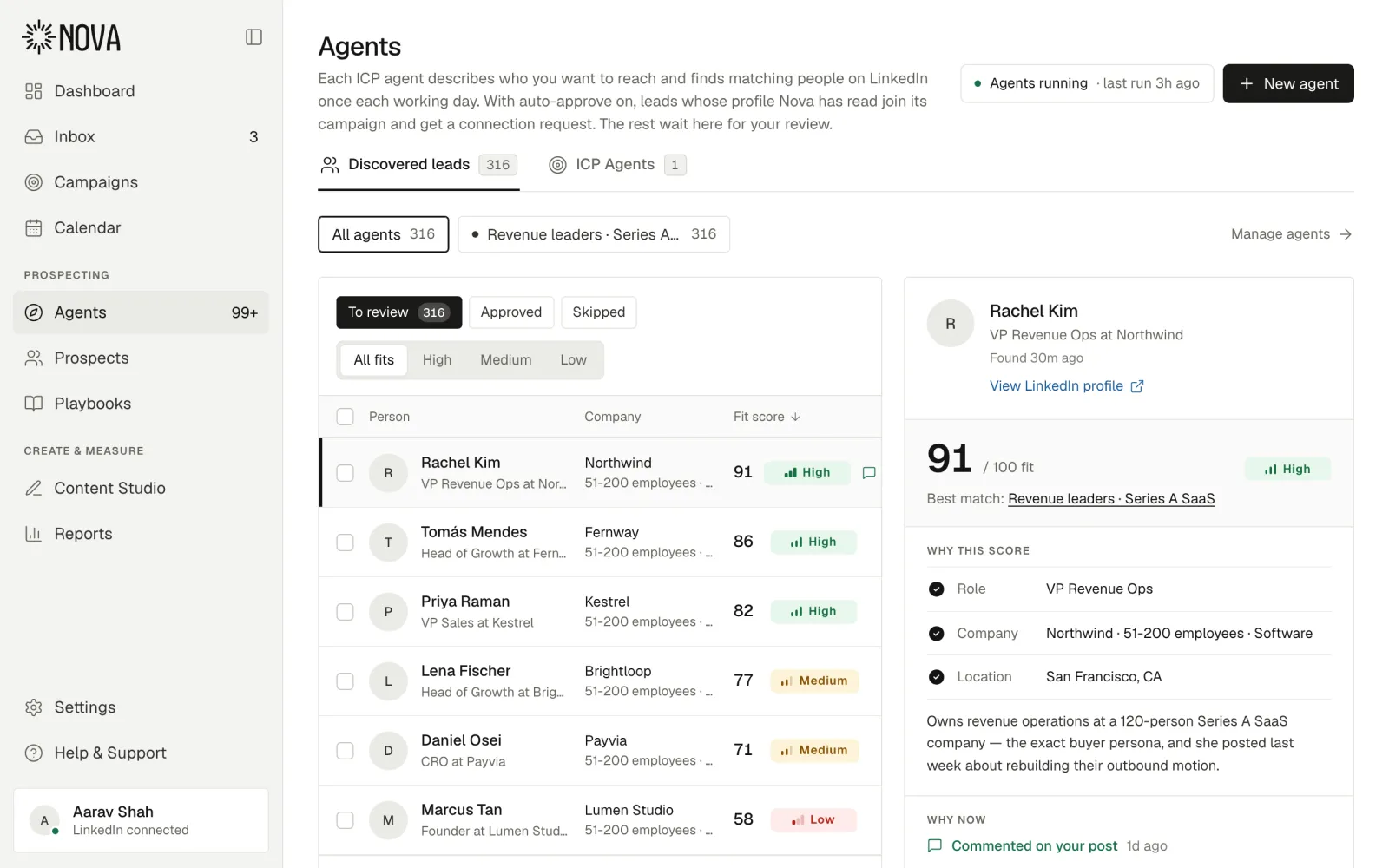
Describe your ideal customer in plain words. An ICP agent turns it into LinkedIn searches, runs them every morning, scores each match and tells you why it fits.
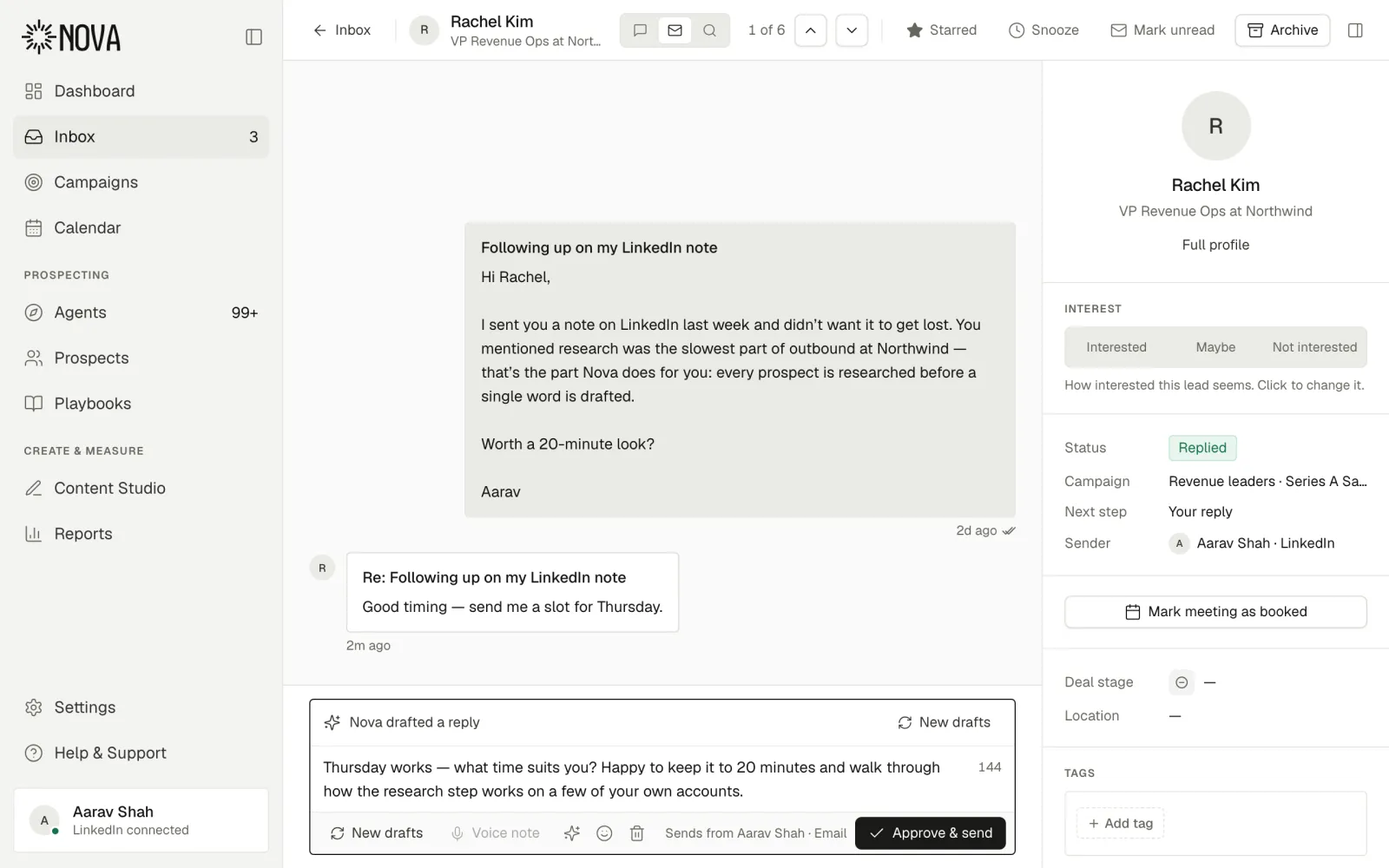
Clear the day’s drafts from one queue — approve, edit or skip. Nova sends at a human pace, follows up by email when an invite goes quiet, and brings every reply back to one inbox, ready for you to answer.
Thursday works — what time suits you?Approve & send
THE PRODUCT
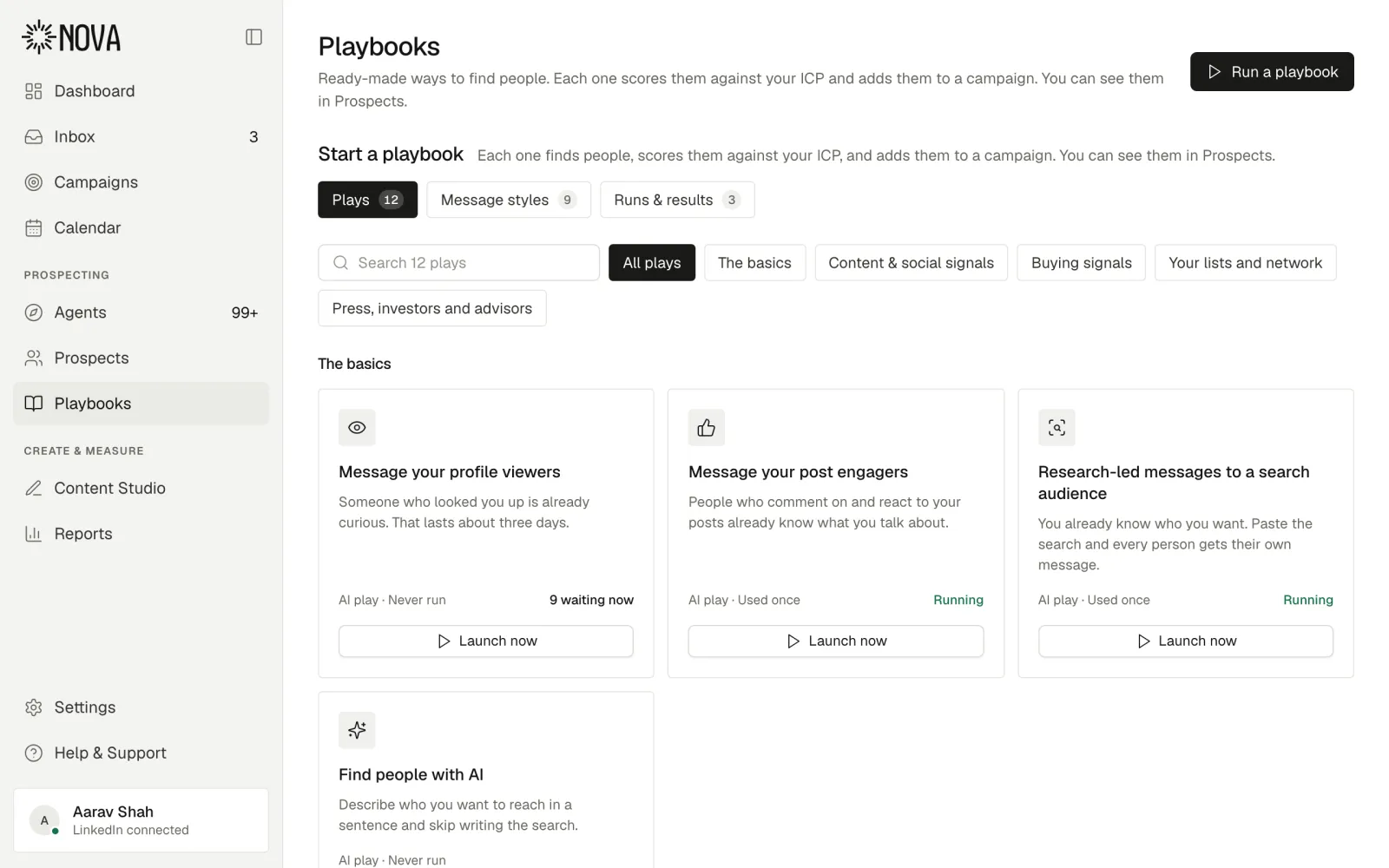
What Nova does for you,from first search to booked call.
Seven parts of one workspace. They share the same leads, the same voice and the same safety limits, so nothing falls between tools.
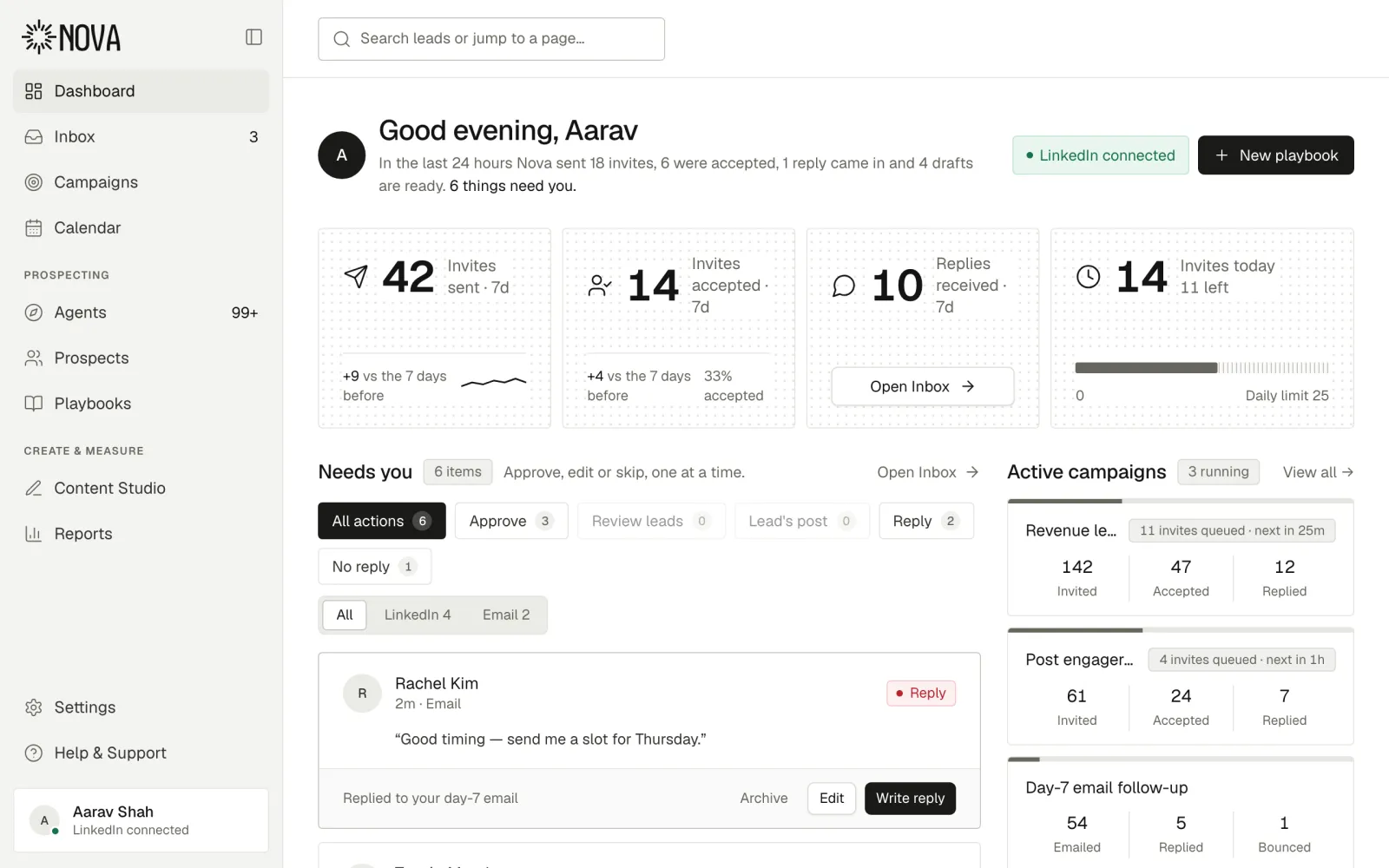
Know what needs you before your first coffee.
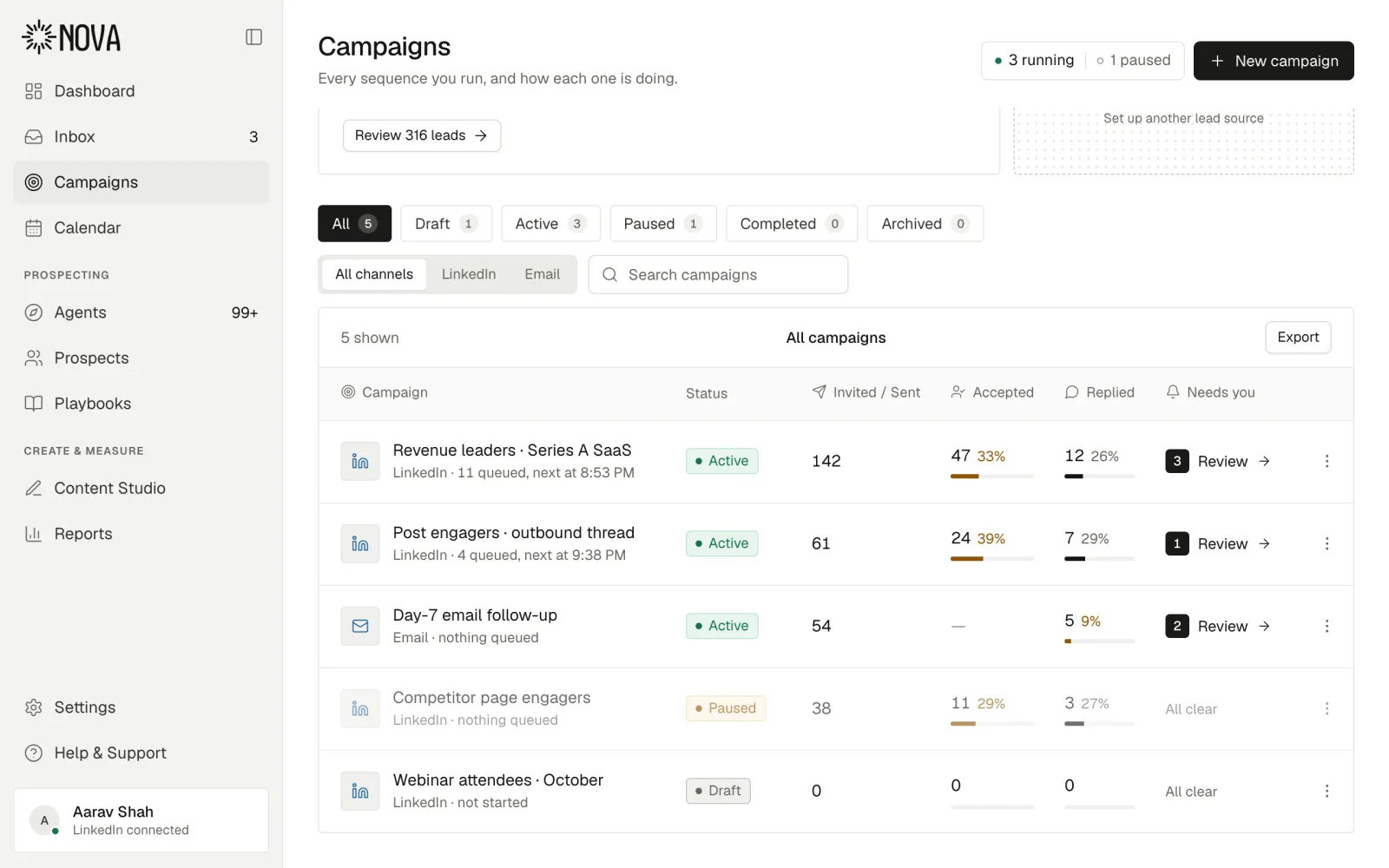
See what Nova did overnight, which drafts and replies are waiting, and how acceptance and replies are trending.
ALSO IN NOVA
ICP agents
Describe a customer; an agent searches LinkedIn for them every working day.
Prospects
Everyone Nova found or talked to — fit, stage and campaign in one table.
Calendar
Meetings and scheduled posts in one view. Drag a post to move it.
Reports
Invites, acceptance, replies and calls booked, by campaign and account.
Profile review
Your LinkedIn profile graded against your ICP, with one-click rewrites.
Voice & writing styles
Drafts start from how you write, in the sales method you pick.
Blocklist & compliance
Companies and domains Nova never contacts, plus rules every message follows.
Members & seats
Each teammate connects their own LinkedIn, with its own limits.
Workspace tools
Slack reply alerts, Apollo, SalesQL, QuickEnrich, Clay and your LinkedIn page.
CONTENT STUDIO
Give them a reason to reply.Posts and a profile to back you up.
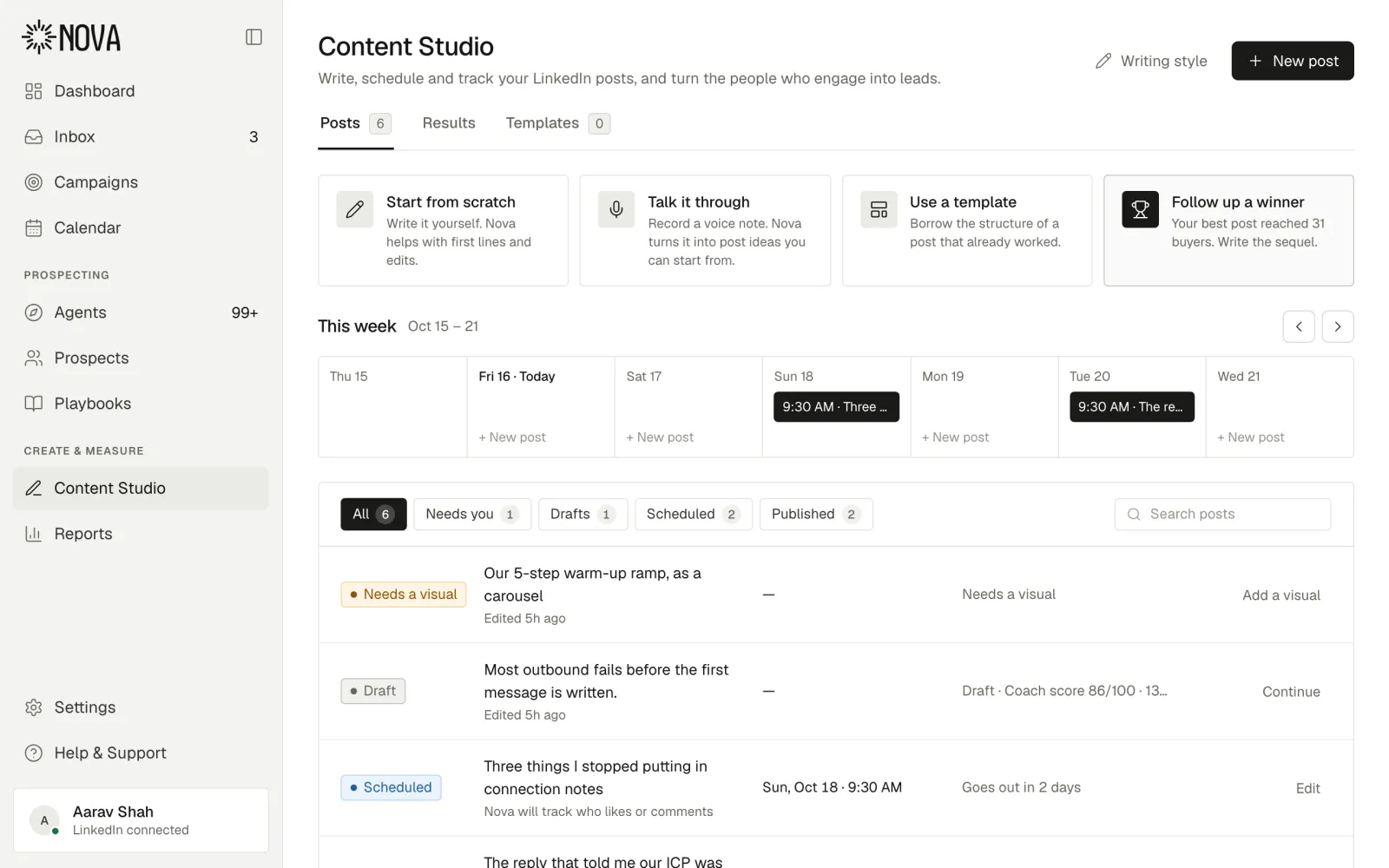
People check your profile before they accept. Content Studio writes your posts with the same tone profile as your messages, and anyone high-fit who engages can join a campaign.
Content Studio
Write, schedule and track your LinkedIn posts, and turn the people who engage into leads.
Writing styleNew post
4
Posts published
26.5k
Impressions
195
Engagers · 60 high fit
78
Added to campaigns
25
Replied
Start from scratch
Write it yourself. Nova helps with hooks and edits.
Talk it through
Record a voice note. Nova turns it into a draft in your voice.
Use a template
Borrow the structure of a post that already worked.
Follow up a winner
Your best post reached real buyers. Write the sequel.
What’s working
Posts that open with a specific number got
2.3×
more high-fit engagers than the rest.
Best time to post
Tuesday and Thursday mornings. Your next post is already in that window.
Profile reviewer
Your profile scored against your ideal customer, section by section, with rewrites you accept in one click. Try the free LinkedIn profile review — no account needed.
6284
Voice notes
A cloned voice reads the message you approved. Never a first cold touch, and nothing sends unheard.
0:14
WHO IT’S FOR
Made for whoeverdoes the selling.
FOUNDERS, CONSULTANTS AND SOLO SELLERS
Sell without a sales team.
Nova does the searching, the research and the first drafts. You spend a few minutes a day approving, then get back to building.
Overnight Nova sent 18 invites, 6 were accepted and 1 reply came in.
12
things need you
316
new leads
Next post · Tue 9:30 AMScheduled
SALES TEAMS AND RECRUITERS
Every sender, one workspace.
Share one ideal customer profile and one set of agents, give each rep or recruiter their own LinkedIn account and mailbox, and see every reply in one place.
Your LinkedIn, your mailbox and calendar, your data providers and your CRM — no CSV handed between tools.
LinkedIn
Gmail
Slack
Outlook
Google Calendar
Zoho Mail
SMTP / IMAP
Apollo
SalesQL
QuickEnrich
Clay
HubSpot
Zoho CRM
Attio
Close
Browser extension
LinkedIn Page
Nova
LINKEDIN
LinkedIn
Your LinkedIn account, Sales Navigator included — searches, invites and messages inside safe per-account limits.
MAIL
Gmail
Send from your own mailbox and domain, threaded and signed as you.
NOTIFICATIONS
Slack
An alert in your team channel the moment a lead replies.
MAIL & CALENDAR
Outlook
Send from your Outlook mailbox and keep meetings on your Outlook calendar.
CALENDAR
Google Calendar
Keep meetings on your Google Calendar.
MAIL
Zoho Mail
Send from your own mailbox and domain, threaded and signed as you.
MAIL
SMTP / IMAP
Connect any other mailbox over SMTP and IMAP and send from your own domain.
DATA
Apollo
Finds a work email and phone number for leads that are missing one.
DATA
SalesQL
Finds a work email and phone number for leads that are missing one.
DATA
QuickEnrich
Finds a work email and phone number for leads that are missing one.
DATA
Clay
Finds a work email and phone number for leads that are missing one.
CRM
HubSpot
Sync leads and replies with HubSpot.
CRM
Zoho CRM
Sync leads and replies with Zoho CRM.
CRM
Attio
Sync leads and replies with Attio.
CRM
Close
Sync leads and replies with Close.
CAPTURE
Browser extension
Connect your LinkedIn session in one click, straight from your browser.
PUBLISHING
LinkedIn Page
Publish Content Studio drafts to your company page.
LinkedInLINKEDIN
GmailMAIL
SlackNOTIFICATIONS
OutlookMAIL & CALENDAR
Google CalendarCALENDAR
Zoho MailMAIL
SMTP / IMAPMAIL
ApolloDATA
SalesQLDATA
QuickEnrichDATA
ClayDATA
HubSpotCRM
Zoho CRMCRM
AttioCRM
CloseCRM
Browser extensionCAPTURE
LinkedIn PagePUBLISHING
MCP
Ask in Claude or Codex.Watch it happen in Nova.
Optional, and nothing in Nova needs it. If you already use Claude or Codex, connect them and ask in plain words: Nova finds the people, does the research and drafts in your voice, in your workspace and inside your limits.
Nova connected
Find people who engaged with my last post and fit my ICP, then draft openers in my voice.
Using Nova
Reading your last post’s engagers · 48 people · 12 match your ICP1.2s
Researching 12 people · Posts, role and company news3.4s
Drafting in your voice · 3 openers2.1s
Rachel, Tomás and Priya fit best. They’re in your Nova review queue with openers drafted.
Who replied this week, and what does each of them want?
Using Nova
Reading this week’s replies · 7 across LinkedIn and email0.9s
Sorting by intent · 3 interested · 2 questions1.6s
Drafting replies in your voice · 5 drafts2.4s
Three people are warm. Rachel asked to talk on Thursday — her reply is drafted for you.
Draft follow-ups for the invites that went quiet.
Using Nova
Finding invites with no answer · 14 pending over 7 days0.8s
Checking for a work email · 9 have one2.7s
Drafting day-7 emails · Same research, your voice2.2s
Nine can get an email. Each picks up from your LinkedIn note and waits for your approval.
codex · ● nova connected over MCP
›summarise this week’s replies and draft follow-ups in my voice
nova.reading this week’s replies7
nova.summarising each threaddone
nova.drafting follow-ups7 drafts
✓ 7 drafts waiting for your approval in Nova. Nothing has been sent.
›
codex · ● nova connected over MCP
›how close is my LinkedIn account to today’s limits?
nova.reading the action ledgertoday
nova.checking warm-up and hoursok
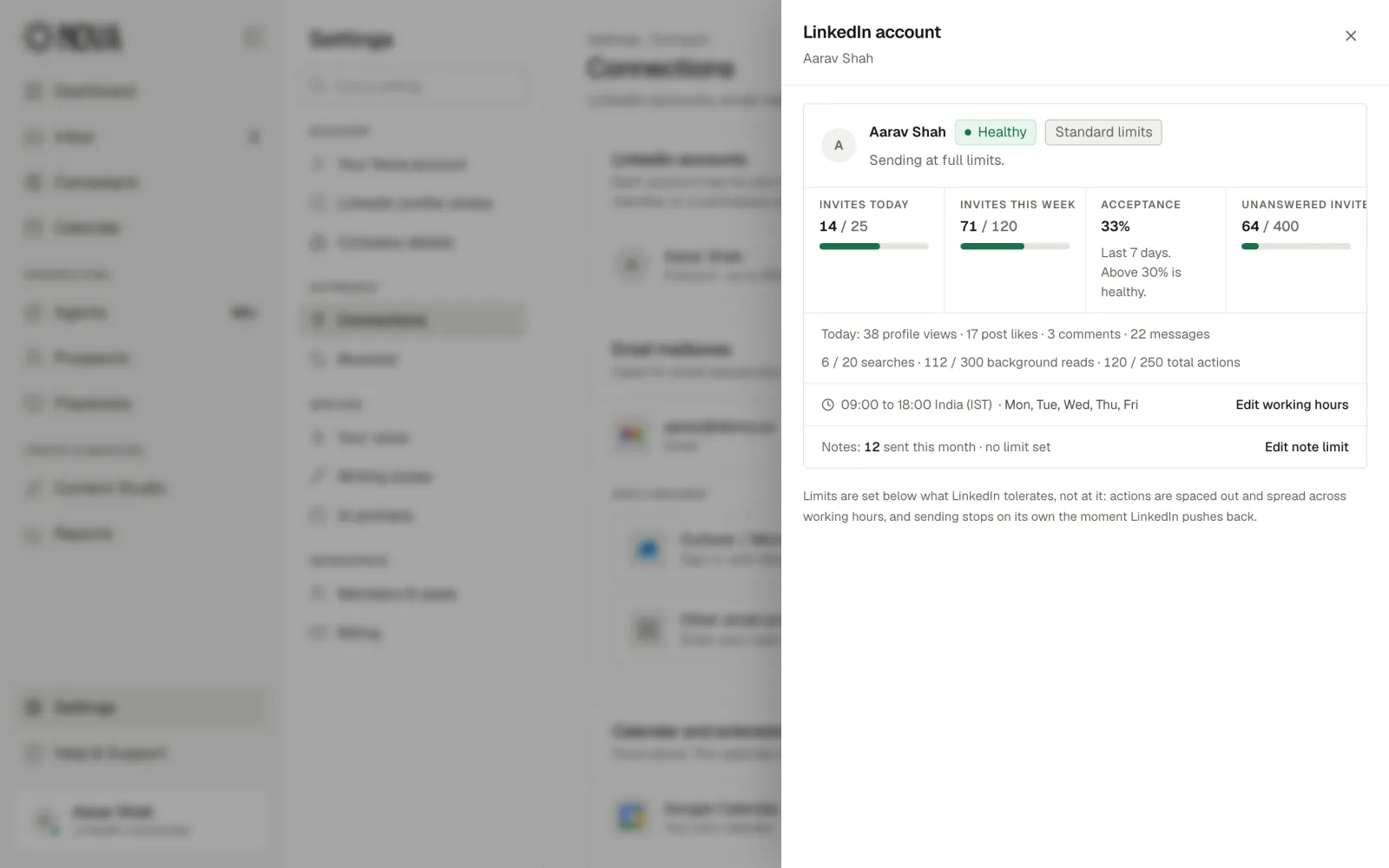
✓ On pace: 14 of 25 invites today. Anything over budget waits for tomorrow.
›
codex · ● nova connected over MCP
›add the people who engaged with my last post to my engagers campaign
nova.matching engagers to leads12
nova.scoring fit against your ICP8 high · 4 low
nova.adding to campaign8 added
✓ 8 added. 4 low-fit people are held for your review instead of being invited.
›
MCP
Nova/Agents
3 found via Claude
Drafted via Claude
Queued via Claude
Drafted via Codex
Read via Codex
Updated via Codex
Start free trialAsk in plain words. Nova does the work inside your limits.
WHY NOVA
One tool instead of a stack.And it does the parts others skip.
Why teams run outreach on Nova.In their own words.
Nova feels like a practical solution for sales and marketing teams that want to scale LinkedIn prospecting without losing the personal touch.
I particularly like the focus on LinkedIn account safety. The gradual warm-up, controlled activity, randomized pacing, and safety budgets show that Nova is designed with long-term outreach in mind rather than just maximizing the number of messages sent.
Engineers delete anything that reads like a template. With Nova, every message I send is built on research about that one person, and nothing goes out until I have read it.
Before Nova, finding and contacting the right people took up a significant amount of our time each week. Now it runs in the background and we spend that time on the conversations.
Every feature, on every plan.Pay per sender, not per feature.
Start with a 7-day free trial, no credit card. Every feature is on both plans, email follow-up and the unified inbox included. If you pay and it isn’t right, we refund your first payment in full within 14 days.
FOR FOUNDERS AND SOLO SELLERS
Growth
Run your own LinkedIn outbound, start to finish.
$99$66.67/ month
Per sender, billed monthly · 7-day free trial, no card required$200 billed every 3 months, instead of $297 · per sender
5 senders, billed monthly · $69 per extra sender · 7-day free trial, no card required$799 billed every 3 months, instead of $1,197 · 5 senders · $207 per extra sender
Nova (joinnova.ai) is an AI LinkedIn outreach platform for founders, sales teams and agencies: it finds people who match your ideal customer profile, researches each one, warms them up with real engagement before any connection request, then drafts the connection notes, messages and voice notes in your voice for you to approve. Email is the second channel — either a campaign off your own list, or an automatic follow-up to invites nobody accepted. Every LinkedIn action passes through a safety governor that paces activity like a person and holds each account to its own ramping daily budget. Nothing AI writes sends by itself; it waits in an approval queue. Self-serve, with a 7-day free trial and no card required.
What makes Nova different from other LinkedIn outreach tools?
Most LinkedIn outreach tools automate sending and stop there. Nova runs the whole job: it finds people who match your ideal customer profile, researches each one, warms them up with profile views, likes and comments before any connection request, and drafts messages, voice notes and posts in your voice. Discovery, campaigns, the inbox, content and profile review share one lead record, so approving a lead, messaging them and seeing them engage with your post happen in the same thread. Every LinkedIn action also passes through a safety governor with per-account limits that ramp as the account earns trust. A quick way to compare tools: count how many separate products you would need to replace Nova, then ask whose safety layer sees all of them at once.
How do I automate LinkedIn outreach without getting restricted?
Pace every action like a careful person would. Nova acts only during your working hours, spaces actions minutes apart with random breaks, and holds each account to a daily budget that ramps up week by week. A governor checks every action against a live ledger right before it runs; when the budget is spent, the action waits for tomorrow instead of forcing through. Brand-new accounts get seven engagement-only days (views, likes and comments, no invites) before their first connection request, because sudden bursts of invites are what trigger LinkedIn reviews. Limits are always per LinkedIn account, never pooled across a workspace, so one busy teammate can’t spend another account’s budget.
Can one platform really replace a whole LinkedIn outreach stack?
Yes. Nova is one app with one login, one workspace and one lead database, not separate tools bundled together. Lead discovery (ICP agents), deep research, campaigns, the unified inbox, voice notes, Content Studio, profile review and the safety layer all share the same ideal customer profile, the same leads and the same per-account budgets. Because everything runs on the same record, nothing gets lost between steps and the safety governor sees every action, whichever feature started it. With separate point tools you re-import CSVs between steps, and each tool spends your LinkedIn limits without knowing what the others did.
Can AI update my LinkedIn profile for me?
Yes, for text. After a profile review you can apply the new headline and About section to your live profile from inside Nova in one click, with no copy and paste. Generated headshots and banners work differently on purpose: they download as files for you to upload yourself, because text edits look like normal profile upkeep while automated image uploads are a pattern worth avoiding. The review grades your headline, About section, banner and photo against what your ideal customers search for, so the rewrite comes from your positioning, not generic advice. Run it again whenever your positioning changes and apply the new copy the same way.
Does Nova do email outreach too?
Yes, in two ways. You can run a campaign that is email from the first touch: paste addresses or LinkedIn profile URLs, or upload a CSV, and Nova finds any missing addresses and sends the sequence from your own mailbox, with no LinkedIn account involved. Or email can be the second step of a LinkedIn campaign: invites still unaccepted after seven days get an email that carries the same research and tone as the invite. Nova won’t aim two channels at the same person at once to inflate touch counts. A reply on either channel cancels every remaining step, so each person has one conversation and one thread in your inbox.
Whose mailbox do the outreach emails come from?
Yours. Connect Google Workspace or Gmail with one sign-in, or any other mailbox (Outlook, Exchange, Zoho or your own host) over SMTP and IMAP. Nova sends from your domain, threaded and signed as you, never from a shared pool or a lookalike domain, because your sender reputation should stay yours. It checks SPF, DKIM and DMARC when you connect and tells you what is missing. A new mailbox gets its own warm-up ramp and daily cap, paced by the same governor and ledger as your LinkedIn invites. Every email has a one-click unsubscribe that is honoured automatically, and a bounced or opted-out address is never mailed again.
Will AI send LinkedIn messages without my approval?
No. Every AI-written message, comment, connection note and voice note lands as a draft in an approval queue, where you edit, approve or discard it. Leads your ICP agents discover have no campaign attached, and the messaging pipeline can’t reach them until a person approves them; the database enforces this, not just the interface. Optional autopilot does one thing only: it approves leads that clearly fit your ideal customer profile. It never approves an unfit lead and never sends a message on its own. You stay the sender, and Nova does the research, drafting and pacing around you.
What does Nova cost, and can I get a refund?
Growth is $99 a month per sender and Agency is $399 a month for five senders, with every feature on both plans and a discount on the 3-month term. Every account starts with a 7-day free trial and no credit card. If you subscribe and Nova isn’t right for you, ask within 14 days of your first payment and we refund it in full. You can cancel any time from Settings → Billing, and you keep access until the end of the period you paid for.
How do I get started?
Sign up with your work email. Nova is self-serve, with a 7-day free trial and no card required. Onboarding takes you through it in order: connect your LinkedIn account, build your ideal customer profile with the assistant, and your ICP agent brings you your first batch of leads to review. Nothing goes out cold: a new account spends its first days on engagement only while the safety governor ramps its daily budget, and every message waits for your approval. If you would rather be walked through it, book a demo and we will set up the ICP and first campaign with you.
GET STARTED
Your buyers are already on LinkedIn.Start the conversation today.
Connect LinkedIn, describe who you sell to and approve your first drafts. LinkedIn first, email when it has to be.


 Fidel Softech
 Oak 21 Real Estate
 Guardr AI
 HealOps
  RapidScan AI
 Single Source Branding
 TribeHQ















 Rachel, Tomás and Priya fit best. They’re in your Nova review queue with openers drafted.
 Drafted via Codex