What is LinkedIn warm-up?
Warming up a LinkedIn account means ramping its activity gradually — starting with engagement only (profile views, reactions, the occasional comment) and adding connection requests in small, increasing numbers over weeks — so the account's behaviour never jumps ahead of what its history supports. LinkedIn's detection watches for sudden change: an account that did nothing last month and sends seventy invites this week is the pattern restrictions are built to catch. Warm-up is how you avoid ever producing it.
It is worth doing for three accounts, not one: a genuinely new account, an old account that has been dormant, and — the one teams forget — an established account that is new to automation. All three are about to change behaviour; warm-up makes the change look like a person getting busier rather than software switching on. Why LinkedIn reads it that way — the signals, the restriction anatomy — is the account safety guide's territory; this page is the schedule.
How long does it take to warm up a LinkedIn account?
The working ramp, hedged where it must be: LinkedIn publishes none of these numbers, so treat the ranges as ceilings to stay under and vary the actual count day to day — identical numbers every day are themselves a machine signature.
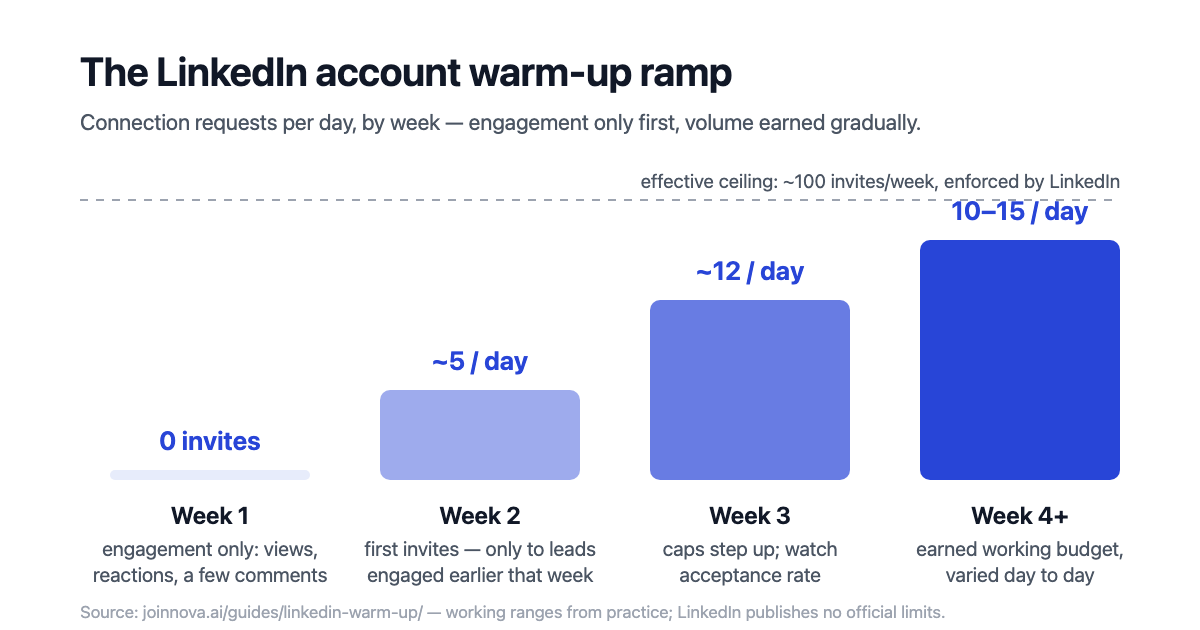
| Week | Connection requests | What the account does instead |
|---|---|---|
| Week 1 | 0 — none at all | Engagement only: view profiles in your target market, react to a handful of posts, leave one or two genuine comments a day. Complete the profile — photo, headline, about section — if it isn't already; a free profile review scores those three in a minute. |
| Week 2 | ~5/day, not every day | Keep the engagement running; invite only people you engaged with earlier in the week, so each invite lands on a warm profile view. |
| Week 3 | ~12/day with rest days | Start normal messaging with the connections who accepted. Watch acceptance rate — if it drops below roughly a third, fix targeting before adding volume. |
| Week 4+ | 10–15/day working range | Full budget, earned: messages, engagement and invites in the shape covered by the complete outreach guide — always under the ~100/week invite ceiling. |
Three rules ride on top of the table. Act during your own working hours, with gaps measured in minutes and real breaks — not on a 24-hour spread. Never "catch up" a missed day by doubling the next one; budgets don't roll over. And if a week goes badly — acceptance falls, or LinkedIn shows any warning — hold the current level or step back one week rather than pushing through.
Warming up the lead, not just the account
The same word covers a second practice that compounds with the first: engaging with a specific prospect — a profile view, a reaction to something they wrote — in the days before their invitation, so your name is vaguely familiar when it arrives. Familiar invites get accepted more, and acceptance rate is itself a safety signal: it is how LinkedIn distinguishes someone building a real network from someone spraying strangers. Account warm-up earns the right to send invites; lead warm-up makes each invite count for more. A system doing both is sending fewer, warmer invites than a volume tool — and getting more from them.
How to tell the account is ready
- Acceptance rate holds as volume steps up — roughly a third or better on a well-targeted list. Falling acceptance means the ramp is outrunning the targeting.
- No warnings from LinkedIn — no "unusual activity" prompts, no verification challenges, no invite-limit notices mid-ramp.
- The pending pile stays small. Withdraw invitations that have sat unanswered for a few weeks; hundreds of pending invites suppress the account's effective limits.
- Replies are happening. An account whose invites turn into conversations is building exactly the history that earns bigger budgets later.
What skipping warm-up looks like
The failure mode is always the same story compressed: a new tool connected on Monday, a full week's worth of invites sent by Wednesday, an invite ban by Friday — and a restriction that resets the account's trust to below where it started. Recovery exists (the safety guide covers it), but it costs weeks of reduced volume: a restricted account must re-earn its budget like a new one. Four weeks of patience is cheap against that; the accounts that get restricted are almost never the ones sending twelve well-targeted invites a day.
Automating the ramp, honestly
Full disclosure: we build Nova, and this schedule is not advice we wrote for a blog post — it is approximately what Nova's safety governor enforces. New accounts get seven engagement-only days before their first invite; budgets step up weekly by trust tier; a governor checks every action against a live ledger and makes actions wait when a budget is spent; and each lead is engaged before its invite goes out. The safety section describes the mechanism, and the comparison pages show how that differs from tools where warm-up is a setting you configure and can get wrong. If you run warm-up manually, the schedule above is the whole method — the discipline is the hard part, and it is exactly the part worth automating.
A mailbox needs the identical treatment, for the identical reason: a domain with no sending history is judged on volume before it is judged on content. If email is your second channel, warm it up on its own ramp — the cold email deliverability guide covers authentication and that ramp together.
Frequently asked questions
How long does it take to warm up a LinkedIn account?
Plan for about four weeks from zero to a full working budget: an engagement-only first week with no invites at all, roughly five invites a day in week two, around twelve in week three, and a 10–15-per-day working range from week four — always under the roughly-100-per-week ceiling LinkedIn enforces. An account with years of normal history that is merely new to automation can move faster, but should still start well below its ceiling and earn the increases. The honest caveat: these are working ranges from practice, not published LinkedIn numbers — the platform never documents limits, and the right pace varies with account age, network size and acceptance rate. The shape is what matters: start with engagement, add invites in small numbers, increase only while acceptance stays healthy. Rushing the ramp is the single most common cause of early restrictions.
Can I skip warm-up if my LinkedIn account is old?
Age helps, but it is not the whole test — what LinkedIn evaluates is behaviour against the account's own history. A ten-year-old account that has never sent more than three invites a week and suddenly sends seventy produced exactly the anomaly detection looks for; the account's past is the baseline the spike is measured against. What an established account earns is a shorter ramp, not no ramp: it can usually skip the zero-invite week and start with a handful of invites a day, stepping up over two weeks or so while watching acceptance rate. The other half of warm-up applies at any age: engaging with a specific prospect before inviting them raises acceptance, and acceptance rate protects the account. Old accounts get restricted for sudden behaviour changes just as reliably as new accounts do for early volume.
Does warming up a LinkedIn account guarantee it won't be restricted?
No — and distrust anyone who promises otherwise. Warm-up removes the most common trigger (volume the account has not earned), but restrictions also follow from machine-regular spacing, off-hours bursts, low invite-acceptance rates, big pending-invite piles, and session anomalies like unusual login locations. Automation of any kind is also against LinkedIn's User Agreement, so every tool in this category carries irreducible risk — warm-up shrinks it, nothing eliminates it. Treat warm-up as one layer of a system: ramped budgets, human-hours pacing with irregular gaps, targeting good enough that most invites get accepted, and a hard stop when a daily budget is spent. If a vendor sells warm-up as a guarantee, ask what happens when a budget runs out; "actions wait" is the only right answer, and it is the rest of the system doing the protecting.
Want the ramp, the budgets and the lead warm-up enforced automatically, with a human approving every send? Start free trial — self-serve, 7-day free trial, no card required.